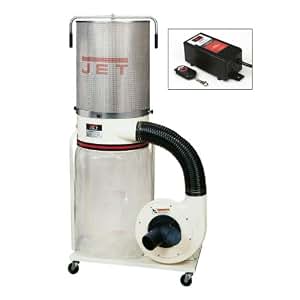
Dust collectors are essential for maintaining clean and safe environments in various industrial settings, woodworking shops, and manufacturing facilities. Remote controls for dust collectors offer convenience and efficiency, allowing users to operate the equipment from a distance. However, these remote controls can sometimes malfunction, leading to frustration and downtime. In this article, we will explore common issues with dust collector remote controls, their causes, and effective troubleshooting steps.
Understanding Dust Collector Remote Controls
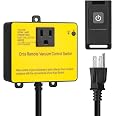
Before diving into troubleshooting, it’s important to understand what dust collector remote controls do and how they function. Typically, these remote controls use radio frequency (RF) or infrared (IR) signals to communicate with the dust collector. The main components of a dust collector remote control system include:
- Transmitter: The handheld device used to send signals.
- Receiver: The component connected to the dust collector that receives the signals.
- Power Supply: A battery or electrical source that powers both the transmitter and receiver.
With this basic understanding, we can delve into common issues and their troubleshooting methods.
Common Issues with Dust Collector Remote Controls

Here are some frequent problems users encounter with dust collector remote controls:
- No Response from the Dust Collector: The dust collector does not activate when the remote is pressed.
- Intermittent Operation: The dust collector turns on and off unexpectedly.
- Limited Range: The remote control works only within a short distance.
- Signal Interference: Other devices disrupt the communication between the remote and the dust collector.
- Battery Issues: The remote control’s battery may be low or dead.
Troubleshooting Steps for Common Issues
Now that we have identified the common issues, let’s explore the troubleshooting steps for each problem.
No Response from the Dust Collector
If your dust collector doesn’t respond when you press the remote control, try the following:
- Check the Power Supply: Ensure that the dust collector is plugged in and powered on. Look for any blown fuses or tripped circuit breakers.
- Inspect Connections: Verify that all connections between the receiver and the dust collector are secure. Loose connections can lead to failure in signal transmission.
- Test the Remote Control: Point the remote at the receiver and press the button. If there’s no response, try replacing the remote’s battery.
- Reset the System: Turn off the dust collector, wait for a few minutes, and then turn it back on. This can sometimes reset any internal errors.
Intermittent Operation
If your dust collector operates inconsistently, consider the following troubleshooting tips:
- Check for Obstructions: Ensure there are no physical obstructions blocking the line of sight between the remote and the receiver.
- Inspect the Receiver: Look for any signs of damage or corrosion on the receiver that could affect its performance.
- Test the Remote from Different Angles: Sometimes, the angle of transmission can affect the signal. Try using the remote from various angles and distances.
- Replace the Batteries: Weak batteries can lead to intermittent signals. Replace them to see if the problem persists.
Limited Range

A common complaint is that the remote control only works within a limited range. Here’s how to address this issue:
- Check the Specifications: Confirm the expected range of the remote control. Some models have limited operational distances.
- Remove Interference: Other electronic devices, such as wireless routers and microwaves, can interfere with the remote’s signal. Try to minimize the number of devices operating in the vicinity.
- Positioning the Receiver: Make sure the receiver is positioned in an optimal location, away from metal objects and walls that could block signals.
- Upgrade Your Remote: If the range is consistently inadequate, consider upgrading to a model with improved range capabilities.
Signal Interference

Signal interference can be frustrating, particularly in busy industrial environments. To troubleshoot, consider the following:
- Identify Interference Sources: Take note of other devices that may operate on similar frequencies and try to turn them off to test if the problem persists.
- Change Frequency Settings: If your remote control allows it, change the frequency settings to avoid overlapping with other devices.
- Reposition Equipment: Sometimes, simply rearranging the layout of equipment can mitigate interference issues.
Battery Issues
Battery-related problems are among the easiest to troubleshoot. Here’s how to handle them:
- Check Battery Level: Replace the batteries with fresh ones to see if this resolves the problem.
- Inspect Battery Contacts: Ensure that the battery contacts in the remote are clean and free from corrosion. Use a soft cloth to clean them if necessary.
- Use Recommended Battery Type: Always use the battery type recommended by the manufacturer to prevent compatibility issues.
Case Studies: Real-World Troubleshooting Scenarios
Understanding how to troubleshoot is made easier with real-world examples. Here are two case studies:
Case Study 1: Intermittent Operation in a Woodworking Shop

A woodworking shop experienced intermittent operation of their dust collector. After thorough troubleshooting, it was found that the receiver was placed behind several metal machines, which were obstructing the signal. By relocating the receiver to a more open area, the intermittent operation ceased, and the remote control functioned effectively.
Case Study 2: Limited Range in a Manufacturing Facility
In a manufacturing facility, employees reported limited range with their dust collector remote. Upon investigation, it was discovered that the facility had several wireless devices operating on similar frequencies. After changing the remote control’s frequency setting, the range improved, and the dust collector could be operated from a greater distance.
Troubleshooting issues with dust collector remote controls doesn’t have to be a daunting task. By understanding common problems and employing systematic troubleshooting techniques, users can often resolve issues quickly and effectively. Remember, maintaining your equipment and ensuring a clean environment are crucial for productivity and safety. Regular inspections and prompt attention to potential issues will not only prolong the lifespan of your dust collection system but also enhance overall operational efficiency.
Key takeaways include:
- Understand the basic components of dust collector remote controls.
- Identify and troubleshoot common issues such as no response, intermittent operation, limited range, signal interference, and battery issues.
- Utilize real-world scenarios to apply troubleshooting techniques effectively.
- Regular maintenance and inspections are essential for optimal performance.
By following these guidelines, you can ensure that your dust collection system operates smoothly and efficiently, thereby creating a safer working environment.